

UNPIVOT in Excel. And no, it is not something to expect in the next release, but in practice it is a function that is missing from the standard toolkit.
There are operations in Excel that we perform so frequently that we stop noticing how much time they consume. UNPIVOT is one of them. In simple terms, it is the transformation of a wide data table into a long, normalized table.
If you work with financial models, P&L, pricing, plan vs actual analysis, or exports from EPM or ERP systems, you know this structure well:
- wide format (easy for a human to read): ID | Jan | Feb | Mar | …
- long format (convenient for everything else): ID | Period | Value
In Power BI, SQL, or Python, this takes a single line.
In Excel, historically, it does not. So every time we end up choosing the same workarounds: Power Query, macros, helper sheets, or manual copy-paste.
This leads to the key question: why does Excel still not include a native UNPIVOT function, even though it is required in a large share of analytical work?
While Microsoft may still be deciding whether this capability should become part of the standard feature set, we built our own solution. In this article, we want to share the approach we used and a few practical observations from applying it in real models.
Why UNPIVOT is a core building block for analytics
A wide table looks nice. But as soon as you want to:
- aggregate data by periods or scenarios
- build flexible pivots
- use GROUPBY, PIVOTBY, or SUMIFS
- load data into Power BI or SQL
- combine multiple sources
… you almost always need the long format.
It sounds simple, but in practice this is one of the most common bottlenecks in models:
Any next step becomes harder until the data is reshaped into a proper structure.
What changed with the introduction of dynamic arrays into LAMBDA
LAMBDA and dynamic arrays marked the moment when Excel stopped being just a calculator.
It became a language for building your own functions.
UNPIVOT is an ideal use case because:
- it is a repeated operation
- the routine is almost always the same
- it is easy to standardize
- the result is needed inside the worksheet, not as a separate Power Query flow
In other words, what used to require Power Query or VBA can now be implemented as a standard Excel function that you simply call like =UNPIVOT(…)
Our target scenario: UNPIVOT with multiple header rows
In real world financial tables, headers are often multi-level:
- first row: year
- second row: month
- third row: scenario (Actual, Forecast, Budget)
If the header is simple, a basic UNPIVOT is usually enough. But once you have a multi header structure, it almost always breaks the “simple” approaches.
That is why we built a LAMBDA function that:
- works with multiple header rows
- combines header levels into a single Period key
- reshapes the data into long format
- returns a clean output with a proper header
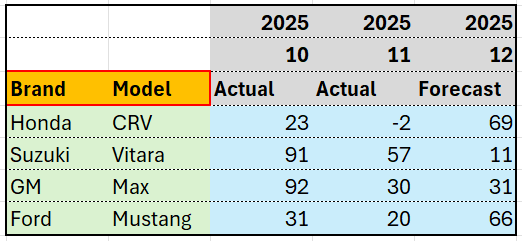
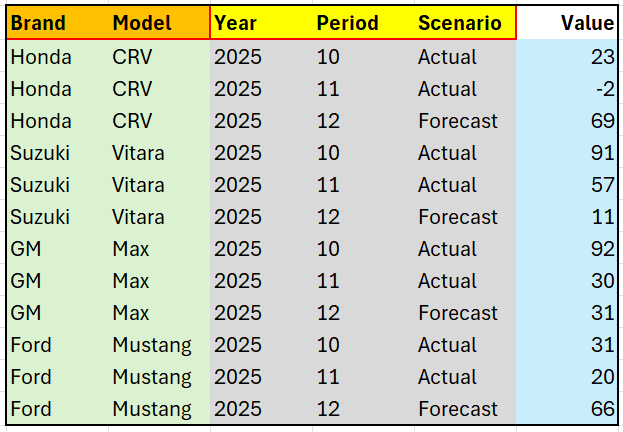
The final function is quite straightforward: =UNPIVOT(rng_for_trim, hdrs_cols, hdrs_rows). Here, rng_for_trim is the table area including the header rows. If the data range is likely to expand over time, the built in TRIMRANGE() helper will automatically trim it to the actual used area. hdrs_cols are the column headers, and hdrs_rows are the row headers. You need to define them separately, since these row headers are usually missing in the source.
UNPIVOT in action looks impressive: Screencast
Before:
After:
What this UNPIVOT enables in a model
1) A single standard.
Save it once in Name Manager, then use it like any other function.
2) Less manual work.
You do not need to build a separate Power Query step or create temporary helper sheets every time.
3) Dynamic behavior.
Add a new period or a new row, and the long format table updates automatically.
4) Lower risk of breaking the file.
The UNPIVOT routine is one of the biggest sources of human error in Excel models.
5) Ready for BI and EPM.
The long format is the most compatible structure for integrating with any external system.
Why I see UNPIVOT as a must have feature in Excel
Excel has grown tremendously as a modeling language: LET, LAMBDA, MAP, BYROW, GROUPBY, and more.
Yet it still lacks a native way to normalize tables directly on the worksheet. UNPIVOT fills that gap.
It makes models faster, cleaner, easier to maintain, and far more integration friendly.
For me personally, it shifts the focus from “how do I reshape this table into the right format” to “what insights do I want to get from these data.”
Question for you:
How do you handle UNPIVOT in Excel today:
Power Query, VBA, manually, or already via LAMBDA?
If you would like to try our code, leave a comment under this post with the word “UNPIVOT”, and we will send you our solution in a direct message 😉